

A practical map of open tools for daily life, civic work, and organisations that want more control
After the Floorboards Are Open
There is a moment in every conversation about technology when the abstract question becomes practical.
We can talk about digital sovereignty, data ownership, vendor lock-in, interoperability, and the politics of infrastructure. We can explain why a device may belong to us while the system controlling it does not, or why downloading our data is not the same as being able to rebuild the life and work held inside a platform.
Eventually, however, someone asks the question that matters most: What can I actually use?
It is a reasonable question. Most of us do not wake up hoping to redesign our digital lives. We wake up needing to answer messages, find an address, open a school document, join a meeting, pay a bill, protect a password, retrieve a photograph, or finish work before the day runs away from us. Technology enters our lives through these small doors. Convenience is rarely a sinister force. It is often simply what helps us get through Tuesday.
That is why advice about open technology can fail even when its principles are right. It can sound as though digital autonomy requires a dramatic conversion: leave every familiar platform, install a new operating system, build a server in the spare room, learn unfamiliar commands, and persuade every friend, colleague, teacher, and family member to migrate with us.
That is not the invitation being made here.
The point is not digital purity. The point is digital agency.
Agency means understanding that we have more than one possible way to write a document, store a photograph, navigate a city, teach a class, organise a community, or communicate with people we trust. It means recognising where our choices are constrained, where they are still open, and where a small change can protect something important.
Open-source software is no longer a marginal experiment hiding at the edge of the technology industry. A European Commission study estimated that EU-based companies invested roughly €1 billion in open-source software in 2018, producing an economic impact of between €65 billion and €95 billion. The same study modelled that a 10% increase in open-source contributions could generate more than 600 additional ICT start-ups annually in the EU. These figures do not mean that every open project succeeds, but they dismantle the idea that open source is merely a charitable hobby carried out after work by a few idealists. It is part of the economic and technical foundation on which modern digital life already stands.
The question, then, is not whether open technology exists.
It is whether we can recognise it, choose it wisely, and use it without creating new problems for ourselves.
Open Tools Are Not a Lifestyle Brand
The imaginary “open-source person” is often presented as someone who understands everything.
They know which operating system to install, which licence governs a project, how to inspect source code, how to configure a server, how to encrypt a drive, and what to type when the screen turns black and starts asking questions in a language made mostly of punctuation.
This person exists. They have rescued many of us from printers.
But they are not the price of entry.
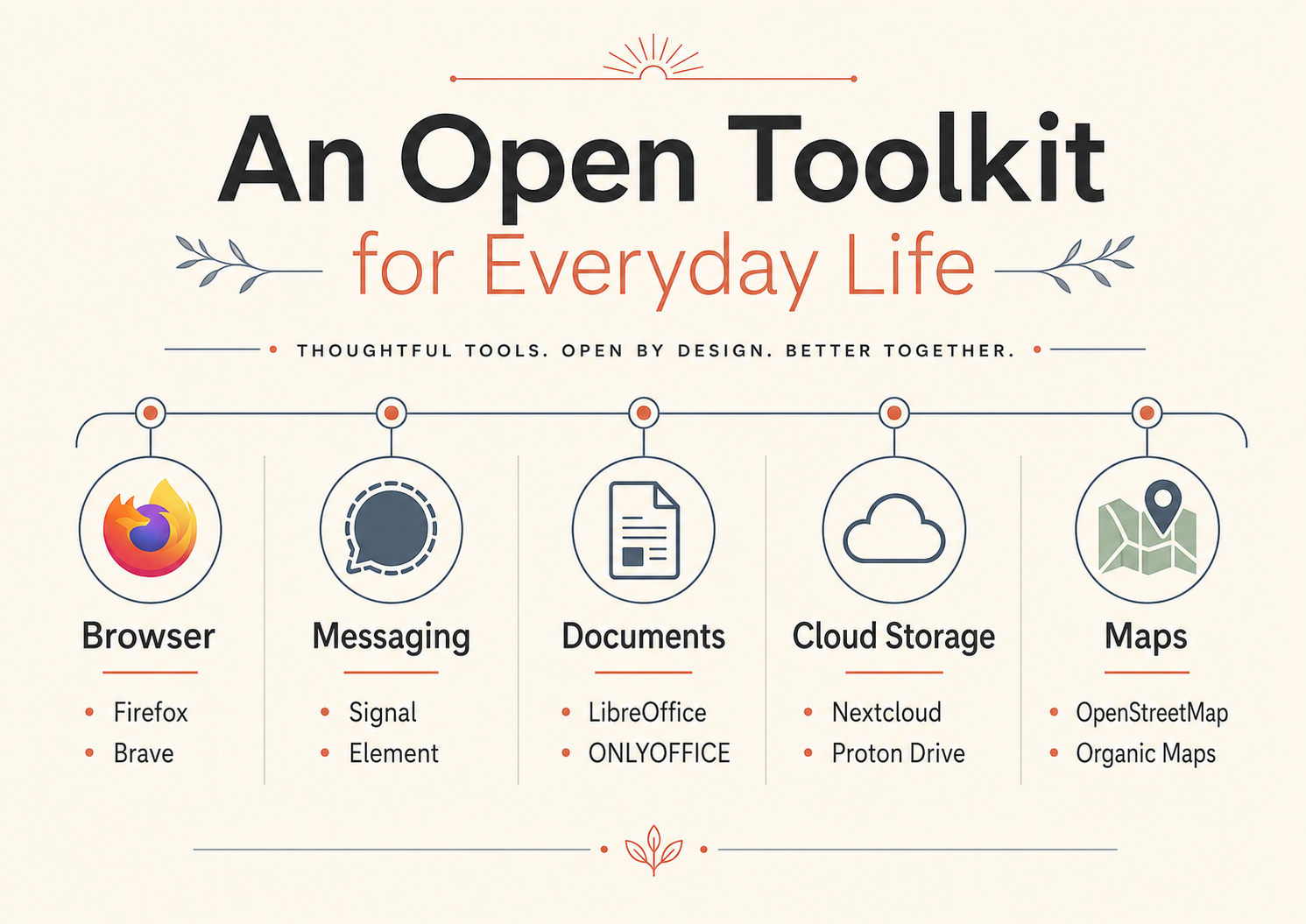
We do not need to understand the internal engineering of Firefox to browse the web with it, just as we do not need to understand an engine before taking a bus. Firefox is an open-source project developed by Mozilla with contributions from a wider community, but for the ordinary user it remains what it should be: a browser that can be downloaded and used.
The same is true across much of our digital lives. People use the VLC media player without thinking about software freedom. Teachers work inside Moodle without introducing themselves as members of the open-source movement. Artists create in Blender. Community organisations publish through WordPress. People edit audio in Audacity, broadcast workshops through OBS Studio, design illustrations in Inkscape, or repair photographs in GIMP. These are not demonstrations of technological virtue. They are tools being used to do work. Their openness matters because it creates possibilities around inspection, modification, translation, reuse, learning, support, and continuity—but the user does not need to carry all of those possibilities personally.
This distinction is important because people are often made to feel that they have failed if they cannot abandon every closed system. Yet many of us cannot choose the platform used by our employer, our child’s school, our municipality, our bank, or the project consortium in which we work. Accessibility needs may make one application workable and another impossible. A family may choose a messaging service because that is where the grandparents are. A freelancer may need to deliver files in the format a client requires. A student cannot always refuse the platform through which assignments are submitted.
Digital autonomy must begin in the world we actually inhabit, not in a purified version of it.
The best first open tool is therefore not the most ideologically impressive one. It is the one that solves a real problem, respects the user, and can continue to be used without turning an ordinary task into unpaid technical labour.
The Browser Is a Front Door
Most of us spend part of every day looking through a browser without really seeing the browser itself.
It feels like a neutral window. We type an address, ask a question, follow a link, open a form, or drift between tabs until the original reason for opening the computer has disappeared somewhere behind a recipe, a news article, and seventeen documents marked “final.”
But a browser is not merely glass. It interprets the web for us. It manages permissions, cookies, extensions, saved information, tracking protections, and the technical standards through which websites reach our devices. It is one of the places where the architecture of the internet meets the texture of daily life.
For most readers looking for an accessible open-source starting point, Firefox remains the clearest recommendation. It does not require a new way of living. It installs on familiar operating systems, supports ordinary browsing, and comes from a project whose source code and development documentation are publicly available.
For people facing higher-risk situations, Tor Browser offers a different kind of protection. It is designed for anonymity and routes traffic through the Tor network, but this can make browsing slower and some websites less cooperative. It is not necessarily the browser we need for checking the weather or ordering groceries. It is a specialist door for contexts in which hiding the path matters as much as reaching the destination.
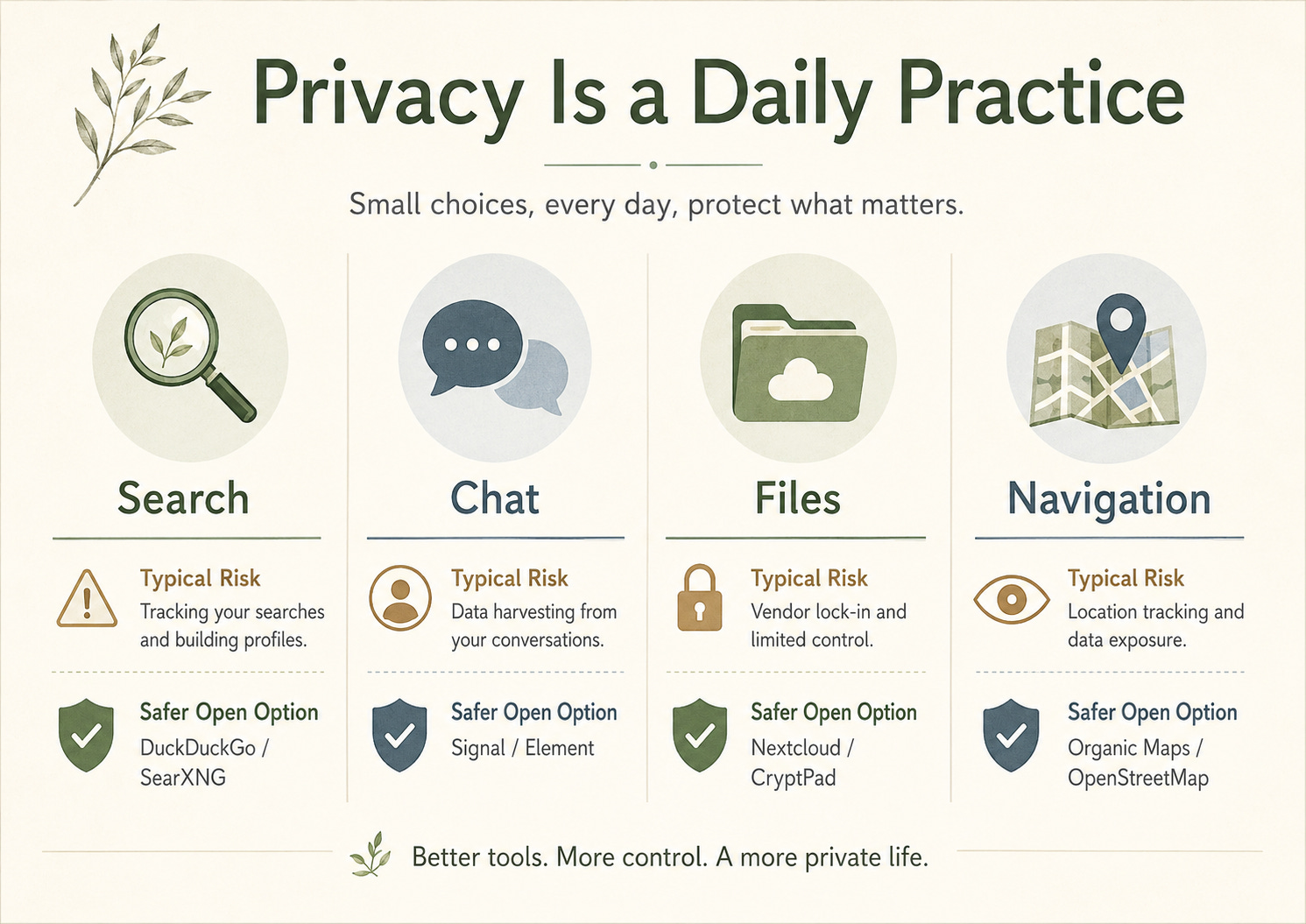
Search creates another layer. A privacy-focused commercial search service may reduce some forms of tracking, but “privacy-focused” and “open source” are not identical descriptions. SearXNG, for example, is an open metasearch engine that gathers results from other search services without building a user profile. Yet it also reveals an important truth about open technology: someone still has to operate the service. We either choose a public instance and place some trust in its administrator, or we run our own and accept the work that comes with it. The software can be open while the practical question remains human: who is responsible for this particular installation?
This is one of the first lessons of the open digital world. Openness does not remove trust. It gives us more information about where trust is placed.
A Document Is Also a Memory
Consider the ordinary document.
It may be a school assignment, a project budget, a letter to a public authority, a family history, a funding application, a research paper, a list of medications, or the notes from a meeting in which a difficult decision was finally made.
On the screen, it looks like text. Beneath the screen, it is a format, a structure, and a set of assumptions about which software will be allowed to read it.
This is why the question of open documents matters more than it first appears. A document can outlive the subscription used to create it. It can outlive the device, the employee, the organisation, and sometimes the institution itself. When we save knowledge inside formats that depend heavily on one supplier, we place part of our memory inside someone else’s business strategy.
LibreOffice provides a mature open-source suite for writing, spreadsheets, and presentations. It supports many familiar file types but uses the OpenDocument Format as its native standard. OpenDocument was created so that documents could be represented through publicly documented specifications rather than being intelligible only to one company’s software. The familiar extensions—ODT for text, ODS for spreadsheets, and ODP for presentations—may look like minor technical details, but they express a larger civic principle: information should remain usable beyond the commercial life of the tool that created it.
This does not mean everyone must immediately convert every file. Complex spreadsheets, carefully designed presentations, macros, and specialised templates can behave differently when moved between office suites. Compatibility should be tested rather than assumed.
Yet even without a full migration, we can begin asking better questions. Which files need to remain editable in ten years? Which records should also be saved as archival PDFs? Are our photographs stored in common formats? Can the tables in our research be exported as CSV rather than being trapped inside a dashboard? Are our notes readable outside the application in which they were written?
CryptPad offers another model for certain kinds of collaborative work. It provides browser-based tools designed around encrypted collaboration, allowing people to write and share without treating the service operator as an invisible reader of every document. It will not replace every complex office workflow, and it does not need to. A good open tool does not have to swallow an entire category of work. It can protect one part of it well.
The deeper issue is not whether we prefer one word processor over another. It is whether the things we create can leave with us.
Communication Is a Collective Decision
Messaging tools reveal the limits of purely individual choice.
We can install the most private, transparent, beautifully governed application in the world. If nobody we need to speak with is there, we have created a very secure empty room.
This is why communication platforms should be understood as social infrastructure. Their usefulness depends not only on features, but on relationships, habits, network effects, accessibility, moderation, and trust.
Signal is a strong personal option for people who want private messaging and calls. Its conversations are end-to-end encrypted, and Signal makes the source code for its clients and server publicly available for examination. It remains a centralised service rather than a federated network, which means openness does not eliminate the role of the organisation operating the system. What it offers is a clear, practical step: a widely usable messenger whose design begins with private communication rather than advertising or behavioural profiling.
Matrix offers a different model. It is an open protocol for communication between independently operated servers. Element is one of the best-known applications built around it. The distinction matters because Matrix is not simply another chat brand. It describes a way in which separate systems can communicate, similar to how email allows people using different providers to send messages to one another.
This can be powerful for communities and organisations seeking more control, but it also requires more governance. A community chat space still needs moderation. Accounts must be managed. Servers require maintenance. Harmful behaviour does not disappear because the source code is visible.
Jitsi Meet offers an open-source option for video calls. It can be used through public instances or hosted more deliberately for an organisation or community. BigBlueButton goes further into the learning environment, providing functions designed for teaching, presentations, discussion, and classroom interaction.
The useful question is not “Which platform is morally perfect?” It is “What are we trying to protect?”
For a family, the answer may be the privacy of everyday conversation. For an activist group, it may be member safety. For a teacher, it may be accessibility and learner participation. For a neighbourhood network, it may be the ability to continue operating without handing community relationships to an advertising company.
Sometimes the first meaningful migration is not an individual deleting an account. It is five people agreeing to create a better room together.
Security Without the Theatre of Fear
Digital-security advice often arrives dressed as a warning.
We are told that threats are everywhere, that everyone is being watched, that our passwords are weak, that our devices are compromised, and that unless we complete a long list of technical rituals immediately, disaster is approaching.
Fear can make people attentive, but it can also make them freeze.
A more humane starting point is to protect the ordinary points of failure. Many people reuse passwords because remembering a different one for every account is not realistic. A password manager changes the task. Instead of memorising dozens of secrets, we protect one strong master password and let the tool create and store the rest.
Bitwarden is an open-source password-management option that can be used through its hosted service or self-hosted by people and organisations with the necessary capacity. KeePassXC takes a more local approach: it stores the encrypted password database under the user’s own control, without requiring a cloud service. Neither model is automatically superior for everyone. Bitwarden may be easier across several devices. KeePassXC may suit someone who wants a local vault and is comfortable managing safe copies of it.
Two-factor authentication adds another layer. An open authenticator application such as Aegis or Ente Auth can generate the temporary codes required by many services. The important habit is not the brand of authenticator but the separation it creates: stealing a password alone is no longer enough to enter the account.
None of this makes us invulnerable. Open source is not a protective spell, and visible code does not guarantee that every flaw will be noticed or repaired in time. What openness can offer is the possibility of scrutiny, independent improvement, and a wider support ecosystem.
Security begins not with imagining ourselves as intelligence agents. It begins with treating the small pieces of access that hold our lives together as things worth caring for.
The Cloud Is Still Someone’s Computer
We speak about “the cloud” as though our files have dissolved into weather.
Photographs float upward. Documents synchronise. Contacts reappear on a new phone. The language is soothing because it removes the machinery from view.
But the cloud is still infrastructure. It consists of computers, storage systems, networks, contracts, accounts, permissions, support teams, energy, maintenance, and decisions about who can access what. Our files have not stopped living somewhere simply because we no longer see the room.
Nextcloud is an open-source collaboration platform that can provide storage, calendars, contacts, communication, and shared files. People can use a provider that hosts it, choose a trusted private cloud, or operate it themselves when they have the capacity. The important shift is that the software does not force every user into one single hosting company. The same underlying platform can be supported by different providers, allowing more room to choose where data lives and who maintains the system.
Syncthing solves a narrower problem. It synchronises files between devices rather than placing them in one central cloud account. That can be useful, but synchronisation is not the same as backup. If a damaged or deleted file is synchronised across every device, the loss may travel efficiently with it. Syncthing’s own description is clear that its purpose is continuous file synchronisation between computers. It can be part of a resilient personal system, but it is not the whole system.
A meaningful personal backup practice does not have to be elegant. It may involve an encrypted external drive, periodic exports, a second copy of irreplaceable photographs, and a calendar reminder to check that the files can actually be opened. The important thing is that one lost password, one closed account, one broken phone, or one changed policy should not be able to erase an entire chapter of our life.
Autonomy begins when memory has more than one home.
The Map That Belongs to Everyone
Maps feel authoritative because they show us the world from above.
They tell us where roads lead, where buildings stand, which businesses exist, how long a journey will take, and sometimes which neighbourhoods are visible enough to be named.
But every map is also a record of attention. Someone had to notice the road, identify the clinic, trace the footpath, spell the village, mark the accessible entrance, or record that a bridge no longer exists.
OpenStreetMap turns this act of attention into a shared global commons. It is a map of the world created by contributors and released as open data. Its community has grown to more than ten million registered users, although—as in many collaborative projects—a smaller core of active contributors performs much of the continuous work.
For everyday navigation, most people will not use the OpenStreetMap editing interface itself. They will use applications built on its data. Organic Maps offers privacy-focused offline maps for walking, driving, hiking, and cycling. OsmAnd provides a more configurable experience with offline navigation and detailed mapping functions. Both demonstrate an important feature of open infrastructure: the shared map can support different applications for different needs without one company owning the only doorway into it.
The civic power of this model becomes clearest during crisis.
The Humanitarian OpenStreetMap Team works with communities and volunteers to map places affected by disasters, displacement, disease, and climate risk. Open geospatial data can help responders locate roads, settlements, health facilities, damaged infrastructure, and communities that may be missing from commercial or official maps.
In April 2026, after severe rainfall caused flooding and landslides in Dominica, the country’s Office of Disaster Management used a HOT-supported mapping tool to coordinate real-time damage assessments. The map was not simply a backdrop. It became part of the response: a living picture built from reports of affected infrastructure and changing conditions.
This is what a digital commons can look like when the abstraction disappears.
It is a road added by a resident because an ambulance needs to find it.
It is a clinic placed on the map before the next outbreak.
It is a neighbourhood made visible enough to receive attention.
From Consuming to Making
Many digital systems train us to remain at the surface.
We click, scroll, watch, react, and move on. Even when the interface is beautiful, the relationship can be strangely passive. The tool is complete, the rules are fixed, and our role is to use what has already been decided.
Open learning and creative tools can change that relationship because they often expose more of the process. They invite people not only to consume digital material but to edit, construct, teach, adapt, translate, and share it.
Moodle is one of the clearest examples. It began as an open-source learning platform and became infrastructure used across schools, universities, public bodies, companies, and civil-society organisations. In 2025, Moodle reported that registered Moodle sites had reached half a billion user accounts. That figure represents accounts rather than a count of unique active people, but the scale still shows how deeply open-source technology can become embedded in mainstream education.
H5P allows educators and creators to build reusable interactive content, including quizzes, interactive videos, presentations, branching scenarios, and learning activities. Its value is not only that the software is open. The content can be created, shared, adapted, and reused across compatible learning and publishing systems.
Kolibri begins from a different reality: many learners do not have stable internet access. Developed by Learning Equality, it is designed to bring educational content into offline and low-connectivity settings, allowing resources to be installed locally and used in classrooms or community environments where the assumption of constant connectivity would exclude people from the beginning.
The same opening appears in creative work. GIMP supports image editing. Inkscape works with vector graphics. Audacity edits and records sound. OBS Studio records and streams video. Blender supports 3D modelling, animation, visual effects, and filmmaking. VLC plays media without demanding that every file first ask permission from a proprietary ecosystem. These tools vary in complexity, and none is automatically the right choice for every professional workflow. Their importance lies partly in the space they create around learning. A student can install the same underlying tool used by an experienced creator. A community group can produce a video without beginning with a recurring licence cost. A volunteer can translate documentation. A developer can build an extension.
Open technology does not abolish skill. Blender does not make us animators merely because it is available. GIMP does not solve design. Moodle does not create good teaching. These tools still require practice, support, imagination, and care.
What they can do is leave the workshop door unlocked.
The Gentle Switch
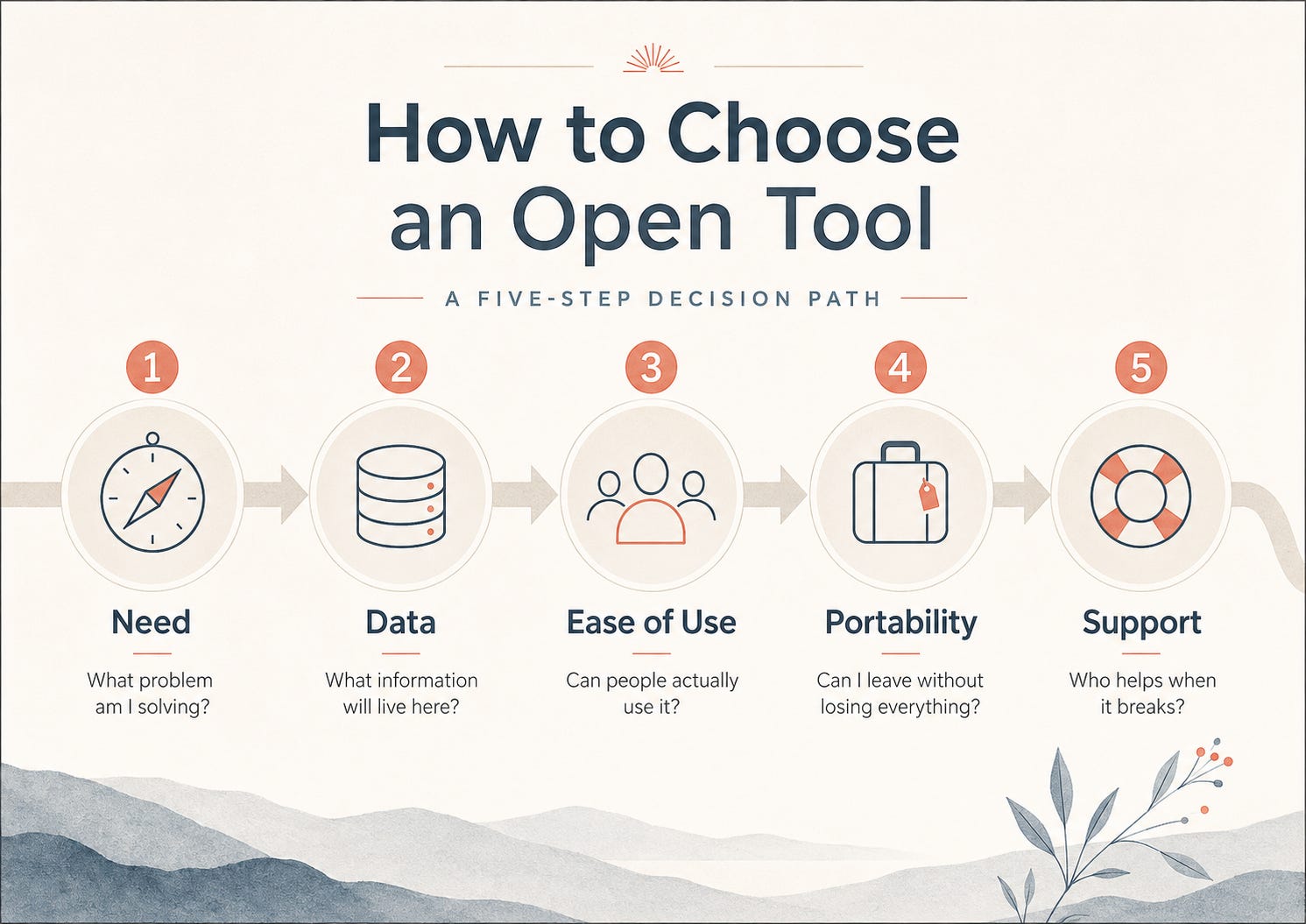
A better digital life does not need to begin with a purge.
It can begin with an experiment small enough to reverse.
We might use Firefox for one week while keeping the old browser installed. We might open a non-critical document in LibreOffice and see what survives the journey. We might try Organic Maps in a neighbourhood we already know, where a wrong turn is inconvenient rather than dangerous. We might store five accounts in a password manager before moving the rest. We might record one presentation in OBS Studio or make one illustration in Inkscape.
The purpose of this first step is not to prove loyalty to a movement. It is to learn where the edges of the tool are. Does it fit the way we work? Is the interface accessible? Can we find help? What breaks when a file moves between systems? Which habits are attached to the old tool, and which of those habits are actually useful?
The second step is to protect what matters before replacing anything. Export contacts. Back up photographs. Download records from a school portal. Save an important document in more than one format. Keep recovery codes somewhere safe. Check which accounts control other accounts. Try opening the backup rather than merely feeling reassured that it exists.
The third step is social. Choose one shared context in which a better tool can become a collective practice. A family group can move private conversation to Signal. A teacher can create an H5P activity. A neighbourhood group can add missing public information to OpenStreetMap. A small association can try CryptPad for one planning document. A team can hold one meeting through Jitsi before considering anything larger.
Small experiments matter because they return proportion to the decision. We are not choosing the digital future of civilisation every time we install an application. We are learning how much room we have to move.
When Open Becomes Another Burden
Not every open-source tool is good.
Some projects are abandoned. Some are insecure. Some have excellent code and terrible documentation. Some require infrastructure far beyond what an ordinary person or small organisation can maintain. Some are built for expert communities and become exhausting when placed in the hands of people who were promised simplicity.
The licence alone cannot tell us whether a tool is safe, mature, accessible, or suitable.
This is where open-source advocacy must become honest. It is easy to praise self-hosting in theory. In practice, a server needs updates, backups, monitoring, security, documentation, and a person who still knows what to do six months after the enthusiastic volunteer has left. Installing software is an event. Maintaining infrastructure is a relationship.
We should also resist replacing one form of exclusion with another. A migration that ignores screen-reader compatibility, language support, cognitive accessibility, low-bandwidth users, old devices, or the realities of staff training is not automatically liberating because the code is open. An inaccessible commons remains inaccessible.
There are also moments when the familiar commercial tool is still the sensible choice. A specialist may depend on features that an alternative does not yet provide. An organisation may need certified support. A student may be required to use a particular platform. A person under pressure may not have the time or emotional capacity to rebuild a workflow.
Freedom includes the freedom to make a gradual, imperfect choice.
The aim is not to produce guilt around every closed application. It is to create enough understanding that convenience no longer disguises dependency, and enough alternatives that dependence is not mistaken for inevitability.
A bad migration can make people afraid of autonomy. A good one leaves them more capable than before.
Open Tools as Civic Muscle
The most important change may not be the application we install.
It may be the question we learn to ask.
Once we begin noticing formats, permissions, backups, protocols, hosting, communities, and maintenance, digital systems stop appearing as natural weather. They become designed environments.
We start to ask why a school requires a commercial account for a basic learning activity. We ask whether a municipality can retrieve its own records from a supplier. We ask whether public information is available in reusable formats. We ask whether a publicly funded platform can be inspected, shared, or adapted by another institution. We ask what happens when a company withdraws a service, raises its price, changes its terms, or decides that the people using the system are no longer the market it wants.
These are technical questions, but they are also civic questions because they concern power, continuity, public money, and our ability to act together.
Europe’s digital policy has increasingly recognised this connection. The European Commission’s 2026 Open Source Strategy places open source inside the wider question of European technological sovereignty: the capacity to develop, control, adapt, and sustain critical technologies rather than relying entirely on external providers. The strategy links open source to reusable public-sector solutions, trustworthy internet technologies, data spaces, artificial intelligence, and open hardware.
But sovereignty is not only something states possess.
There is also the smaller sovereignty of a teacher who can move a course. A family that has a copy of its photographs. A community that can edit its map. A writer whose archive is readable outside one subscription. A young person who can install the same creative tool used by professionals. A local organisation that understands where its information lives.
These choices will not dismantle the concentrated power of the technology industry on their own. They are not a substitute for regulation, public investment, competition policy, labour rights, privacy enforcement, or accountable procurement.
They are civic muscle.
They teach us that systems can be examined. They make us less willing to accept that everything important must remain hidden, rented, or impossible to leave. They remind us that infrastructure is not only what powerful institutions build for us. It can also be what communities maintain with one another.
So what can we actually use?
Enough to begin.
We can use one browser that gives us more room to choose. One format designed to outlive a supplier. One password manager that protects access. One map built from shared attention. One learning tool that can travel into a classroom without constant internet. One creative programme that lets someone make before they can afford to subscribe. One backup that keeps a memory from disappearing.
Open technology is not a single door waiting for us to become technical enough to enter.
It is a corridor of smaller doors. Some lead toward privacy. Some toward repair. Some toward shared knowledge. Some toward stronger public institutions. Some lead only to a tool that does one ordinary job without asking to own everything around it.
That is already a meaningful beginning.
From Personal Choice to Organisational Infrastructure
For individuals, this map is enough to begin seeing the digital world differently. We can experiment, protect what matters, and choose a few tools that give us more control without attempting to rebuild our whole lives at once.
For an organisation, however, the question changes.
A company, school, NGO, municipality, university, funder, or public agency cannot select infrastructure only because one application looks promising. It must consider data, permissions, integrations, accessibility, support, hosting, legal responsibilities, maintenance, staff capacity, continuity, and the cost of leaving later.
The public question was: What can I actually use?
The professional question is more demanding: What can we responsibly adopt, support, govern, and sustain?
Subscribe to our Newsletter to continue reading.
